Connect with us

Technology

Windstream Email: Complete Setup and Login Guide

Published

on

Windstream Email

Windstream Email: Complete Setup and Login Guide
Email remains one of the most important tools for communication in both personal and professional life. Among the many providers available, Windstream Email is known for its reliability, security, and user-friendly interface. However, new users sometimes find it challenging to set up their accounts or access their inbox on different devices. This guide will walk you through everything you need to know about Windstream Email, from setup to login, security, and productivity.

What Is Windstream Email?

Windstream Email is a communication service offered by Windstream Communications that provides users with a secure, easy-to-use platform for managing their emails. It is suitable for personal use as well as professional purposes. The platform offers access on desktop, laptop, and mobile devices, ensuring that users can stay connected wherever they are. Its features are designed to make managing messages simple and effective.

How to Set Up Windstream Email

Creating a Windstream Email account is a straightforward process. To get started, visit the Windstream website and select the option to create a new email account. Enter your personal information, including your name, preferred email address, and a strong password. Setting up recovery options, such as a security question or an alternate email address, is recommended to protect your account. Once you verify your account through the link sent to your alternate contact, your Windstream Email account is ready to use.

Mobile Setup

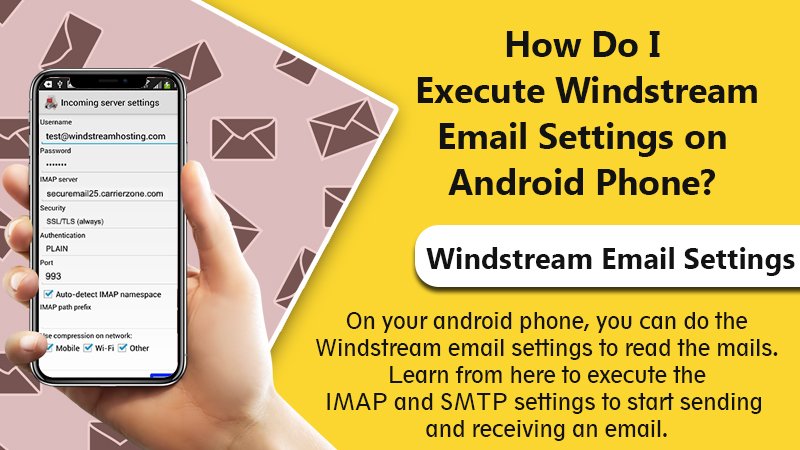
Many users prefer to access Windstream Email on mobile devices. On iOS, go to Settings, select Mail, choose Add Account, then Other, and enter your email credentials. On Android, open the email app, choose Add Account, then Manual Setup, and input your details. You can choose IMAP to sync your inbox across multiple devices or POP3 if you prefer storing emails on a single device. IMAP is generally recommended for users who check email on multiple devices.

How to Log In to Windstream Email

Logging in to Windstream Email is simple. Navigate to webmail.windstream.net, enter your email address and password, and you will be directed to your inbox. Some users encounter login issues due to incorrect credentials, browser issues, or temporary account locks after multiple failed attempts. Clearing your browser cache, using a different browser, or resetting your password usually resolves these issues. If not, Windstream customer support is available to assist with account recovery and troubleshooting.

Email Security Tips

Maintaining email security is essential to protect personal and professional information. Use a strong, unique password with a combination of letters, numbers, and symbols. Avoid reusing passwords across multiple accounts. Regularly monitor account activity to spot unauthorized access and be cautious when opening attachments or clicking on links from unknown senders. Following these steps ensures your Windstream Email account remains safe.

Optimizing Windstream Email for Productivity

Organizing your inbox effectively improves efficiency. Windstream Email allows users to categorize messages, apply filters, and flag important emails. By managing your inbox proactively, you can ensure that crucial messages are easy to find and respond to, while less urgent messages do not clutter your workspace. Features such as auto-replies, search functionality, and email signatures further enhance productivity and streamline communication.

Integrating With Other Platforms

Windstream Email can integrate with calendar applications, task managers, and other email clients. This integration helps users coordinate schedules, manage contacts, and streamline communication across platforms. The ability to connect Windstream Email with other productivity tools makes it suitable for individuals and businesses looking for a reliable and efficient solution.

Common Problems and Solutions

Even with a reliable platform like Windstream Email, occasional problems may arise. Emails may fail to send due to incorrect server settings or connectivity issues. Messages might get stuck in the outbox or fail to sync across devices. Usually, these problems are resolved by checking account settings, verifying server details, or re-entering credentials. If issues persist, Windstream’s support team provides assistance to resolve them efficiently.

Why Windstream Email Stands Out

Windstream Email is appreciated for its speed, reliability, and ease of use. Messages are delivered quickly, server downtime is minimal, and the interface is clean and intuitive. It is accessible for beginners while providing advanced features for experienced users. Strong security measures, including encryption and spam protection, make it a dependable choice for personal and professional communication.

Conclusion: Mastering Windstream Email

Windstream Email is a versatile, secure, and efficient communication platform. By understanding how to set up your account, log in smoothly, and utilize its features, you can maximize productivity while keeping your information safe. Whether you access your email on a desktop, tablet, or smartphone, following best practices ensures a seamless experience. With Windstream Email, managing communications becomes straightforward, organized, and reliable.


Continue Reading
Click to comment

Leave a Reply

Your email address will not be published. Required fields are marked *

Technology

kl7cjnsb8fb162068: A Clear and Reliable Breakdown

Published

on

kl7cjnsb8fb162068

kl7cjnsb8fb162068: A Clear and Reliable Breakdown

In the ever-expanding digital world, strange codes and identifiers often pop up, leaving many curious about their meaning. One such code gaining attention is kl7cjnsb8fb162068. It may seem cryptic at first, but with a structured exploration, its purpose, applications, and significance become much clearer. In this article, we provide a comprehensive, user-friendly guide to kl7cjnsb8fb162068, uncovering its role in modern technology, its functionality, and why it matters to you.

Whether you encountered it in software, on a device, or in technical documentation, understanding kl7cjnsb8fb162068 is easier than you think. Read on to demystify this code and gain practical insights.

What is kl7cjnsb8fb162068?

At its core, kl7cjnsb8fb162068 is an identifier — a string of letters and numbers designed to uniquely represent a digital object, account, or transaction. In technology, such identifiers are critical because they allow systems to:

  • Track data efficiently

  • Avoid duplication

  • Maintain security and integrity

  • Enable accurate retrieval of information

Identifiers like kl7cjnsb8fb162068 are not just random sequences; they follow patterns or algorithms to ensure uniqueness across platforms.

Common Applications of kl7cjnsb8fb162068

  1. Digital Platforms: Websites and apps often assign unique identifiers to users, sessions, or products.

  2. Software Development: Developers use codes like kl7cjnsb8fb162068 to debug, track versions, or manage builds.

  3. Data Management: Databases rely on unique IDs to link information seamlessly without conflicts.

  4. Security: Encrypted or pseudo-random identifiers improve security and reduce fraud.

Understanding these applications gives context to why encountering kl7cjnsb8fb162068 can feel mysterious yet purposeful.

Why Unique Identifiers Matter

Unique identifiers are the backbone of digital accuracy. Without them, managing millions of records, users, or transactions would be chaotic. Here’s why codes like kl7cjnsb8fb162068 are indispensable:

  • Precision: Ensures each entry is distinct.

  • Traceability: Makes it easy to audit data.

  • Reliability: Reduces errors and conflicts in systems.

  • Scalability: Supports the growth of digital infrastructure efficiently.

In short, identifiers like kl7cjnsb8fb162068 might look cryptic, but they keep technology organized and dependable.

Breaking Down kl7cjnsb8fb162068

While it may appear as a jumble of letters and numbers, codes like kl7cjnsb8fb162068 often follow structural logic. Developers can sometimes deduce:

  • Prefix Indicators: The first few letters may represent a system or category.

  • Unique Sequence: The middle segment ensures uniqueness.

  • Check or Hash Digit: The last portion may serve as verification to avoid errors.

Although the precise algorithm behind kl7cjnsb8fb162068 is proprietary in many systems, understanding this format helps users see that it’s systematic, not random.

Real-Life Examples

To put kl7cjnsb8fb162068 into perspective, here are hypothetical examples of similar identifiers:

Code Application Purpose
kl7cjnsb8fb162068 Digital transaction Tracks unique purchase
AB12XY34CD56 Software build Version identification
UID-987654321 User database Ensures distinct accounts
5f2e1d7c9b API token Secure session authentication

As this table shows, identifiers like kl7cjnsb8fb162068 are common across platforms, each with a specific role in ensuring seamless operations.

Security Implications of kl7cjnsb8fb162068

Security is often a top concern when dealing with unique codes. Here’s why kl7cjnsb8fb162068 is more than just an ID:

  1. Data Protection: Unique identifiers reduce the risk of accidental data overwrites.

  2. Authentication: Codes can verify legitimate users or devices.

  3. Fraud Prevention: Randomized sequences make unauthorized duplication challenging.

  4. Audit Trails: Every action can be tracked precisely, ensuring accountability.

When you see kl7cjnsb8fb162068, it represents more than a string; it embodies system reliability and trustworthiness.

How to Use kl7cjnsb8fb162068

Practical use depends on the context in which you encounter it:

  • In Software: Copy and paste into tracking systems or logs.

  • In Databases: Reference it for unique records or queries.

  • In Transactions: Provide it for verification or customer support inquiries.

  • In Documentation: Use it as a reference point for versioning or identification.

By understanding its purpose, you can leverage kl7cjnsb8fb162068 effectively without confusion.

Troubleshooting Common Issues

Sometimes users encounter errors related to identifiers like kl7cjnsb8fb162068. Here’s how to approach them:

  • Mismatch Errors: Verify the full sequence is correct.

  • Access Denied: Ensure the identifier corresponds to an authorized entity.

  • Database Conflicts: Check for duplication or synchronization issues.

  • Logging Problems: Make sure the system recognizes the identifier format.

Awareness and careful handling prevent most problems associated with kl7cjnsb8fb162068.

Best Practices for Handling Unique Codes

For developers, managers, or users dealing with identifiers like kl7cjnsb8fb162068, follow these guidelines:

  • Always store identifiers securely.

  • Avoid manual editing to prevent errors.

  • Use them consistently across systems.

  • Keep a clear mapping of what each identifier represents.

  • Regularly audit usage to detect inconsistencies.

Adopting these practices ensures the identifier fulfills its purpose efficiently.

Frequently Asked Questions (FAQ)

Is kl7cjnsb8fb162068 safe to use?

Yes. Unique identifiers are designed for reliability and security, not for public exposure.

Can I generate my own identifier like kl7cjnsb8fb162068?

Yes, using standard algorithms like UUID or hash functions. However, alignment with system rules is necessary.

Why does the code look random?

Randomness ensures uniqueness and prevents duplication, especially in large-scale systems.

Where will I typically see kl7cjnsb8fb162068?

It can appear in software logs, digital transactions, database entries, or authentication systems.

Conclusion: The Value of kl7cjnsb8fb162068

While kl7cjnsb8fb162068 might seem complex or mysterious at first glance, understanding its role is surprisingly simple. It’s a reliable, unique identifier designed to organize, protect, and track digital entities across systems. From software builds to secure transactions, identifiers like this underpin much of modern technology.

By appreciating the logic, applications, and security behind kl7cjnsb8fb162068, users and developers alike gain clarity, reduce errors, and increase confidence in their digital interactions.

Have you encountered kl7cjnsb8fb162068 in your systems or applications? Share your experience, discuss challenges, or suggest tips — the conversation helps others understand the power and purpose of unique identifiers.

Continue Reading

Technology

Google Pixel 8 Pro: Top Features You Must Know

Published

on

Google Pixel 8 Pro

Google Pixel 8 Pro: Top Features You Must Know

When Google launches a new Pixel device, tech enthusiasts around the world pay close attention. The Google Pixel 8 Pro promises not just incremental upgrades but a redefined smartphone experience. With cutting-edge camera technology, enhanced AI integration, and performance improvements, this flagship model is making waves across the mobile landscape.

Whether you’re a long-time Pixel fan or considering your first Google device, understanding the top features of the Google Pixel 8 Pro is crucial. In this guide, we’ll explore the camera system, display technology, software enhancements, battery life, performance benchmarks, and additional perks that make this phone a standout in 2026.

Design and Build Quality

One of the first things you notice about the Google Pixel 8 Pro is its sleek and modern design. Google has retained the clean aesthetic of previous models while enhancing the ergonomics.

Key Design Features:

  • Premium Materials: The phone features Gorilla Glass Victus on the front and back with an aluminum frame for durability.

  • Ergonomic Form Factor: Slightly curved edges make the device comfortable for long usage.

  • Color Options: Multiple finishes, including Obsidian Black, Glacier White, and Frost Blue, cater to a wide range of preferences.

  • Water and Dust Resistance: IP68 rating ensures protection against splashes and dust, a must for everyday use.

The Google Pixel 8 Pro balances elegance with robustness, giving users a premium feel in hand.

Display Technology: Crisp, Bright, and Adaptive

The display on the Google Pixel 8 Pro is nothing short of stunning. Google has equipped this model with a high-resolution AMOLED panel that delivers vibrant colors and deep blacks.

Display Highlights:

  • Size and Resolution: 6.7-inch QHD+ OLED screen with a 3200 x 1440 resolution.

  • Refresh Rate: Adaptive 120Hz refresh rate for smooth scrolling and gaming.

  • HDR10+ Support: Enhanced color accuracy for streaming videos and media.

  • Brightness: Up to 1,200 nits peak brightness ensures visibility even under direct sunlight.

The display isn’t just about visuals—it’s an interactive experience that makes reading, gaming, and media consumption a pleasure.

Camera System: Redefining Mobile Photography

Perhaps the most talked-about feature of the Google Pixel 8 Pro is its camera system. Google continues to push the envelope with AI-powered photography.

Camera Features:

  • Main Sensor: 50MP wide-angle camera with improved low-light performance.

  • Ultra-Wide Lens: 12MP sensor ideal for landscapes and group shots.

  • Telephoto Lens: 48MP sensor with 5x optical zoom for crisp, distant shots.

  • Front Camera: 12MP selfie camera with enhanced portrait mode.

  • AI Photography Tools: Real Tone, Magic Eraser, and Night Sight 2.0 for professional-quality photos.

Moreover, video recording is exceptional, supporting 4K at 60fps and cinematic stabilization for smooth footage. The Google Pixel 8 Pro isn’t just a camera phone—it’s a mobile photography studio.

Performance and Hardware

Under the hood, the Google Pixel 8 Pro is powered by Google’s custom Tensor G3 chip, designed for AI tasks, photography, and efficiency.

Performance Highlights:

  • Processor: Tensor G3 with enhanced machine learning capabilities.

  • RAM: 12GB for seamless multitasking.

  • Storage Options: 128GB, 256GB, and 512GB configurations.

  • Battery Life: 5,050 mAh battery with adaptive battery management for all-day use.

  • Charging: 30W wired fast charging and 23W wireless charging support.

This hardware ensures the Google Pixel 8 Pro can handle gaming, productivity apps, and AI-driven features without lag.

Software: The Power of Android 14

The Google Pixel 8 Pro runs on Android 14 with Pixel-exclusive features that enhance user experience:

  • Material You Design: Personalized themes and adaptive colors.

  • AI Integration: Improved predictive text, voice commands, and contextual suggestions.

  • Security Updates: Google promises at least 5 years of security updates.

  • Pixel Pass Features: Cloud storage, Google One benefits, and subscription perks.

Android 14 on the Google Pixel 8 Pro feels fluid, responsive, and tightly integrated with Google services.

Connectivity and Network Features

The Google Pixel 8 Pro supports the latest network technologies, making it future-proof:

  • 5G Support: Ultra-fast downloads and streaming.

  • Wi-Fi 6E: Enhanced wireless speeds and stability.

  • Bluetooth 5.3: Better connectivity with earbuds, watches, and other devices.

  • NFC: Seamless mobile payments and pairing with compatible devices.

Whether you’re streaming videos, gaming, or working remotely, connectivity is reliable and fast.

Audio and Multimedia Experience

Audio quality on the Google Pixel 8 Pro has seen significant improvement:

  • Stereo Speakers: Rich, balanced sound for music, podcasts, and calls.

  • Dolby Atmos Support: Immersive audio for movies and games.

  • Noise Cancellation: Advanced microphone setup reduces ambient noise during calls.

Combined with the display and camera, the multimedia experience is truly premium.

Security and Biometric Features

Google takes security seriously. The Google Pixel 8 Pro offers multiple ways to protect your data:

  • Face Unlock: Fast and accurate recognition.

  • In-Display Fingerprint Sensor: Secure and convenient access.

  • Titan M3 Security Chip: Protects sensitive data and payments.

  • Privacy Dashboard: Full transparency over app permissions and data usage.

These features make the Google Pixel 8 Pro one of the most secure flagship devices available.

Accessories and Ecosystem

The Google Pixel 8 Pro is compatible with a range of accessories that enhance the user experience:

  • Pixel Buds Pro: Seamless pairing with superior audio quality.

  • Pixel Stand Wireless Charger: Fast wireless charging with smart display features.

  • Cases and Skins: Durable protection without compromising style.

  • Smart Home Integration: Works with Nest devices and Google Assistant for automation.

Being part of the Google ecosystem ensures a cohesive experience across devices.

Pros and Cons of Google Pixel 8 Pro

Pros:

  • Exceptional camera performance

  • Smooth 120Hz display

  • Long battery life with fast charging

  • Clean Android 14 experience with timely updates

  • Advanced AI and machine learning features

Cons:

  • Premium pricing

  • No expandable storage

  • Limited availability in some regions

Pricing and Availability

The Google Pixel 8 Pro is available globally with starting prices around $999 for the base 128GB model. Pricing scales based on storage options and regional taxes. Early pre-orders often include exclusive accessories or promotional offers.

Tips for Choosing the Right Google Pixel 8 Pro

  • Determine your preferred storage based on usage: 128GB for light users, 512GB for heavy media collectors.

  • Consider color preferences and matching accessories.

  • Compare trade-in options if upgrading from an older Pixel.

  • Evaluate network compatibility if traveling internationally.

Conclusion: Is Google Pixel 8 Pro Worth It?

The Google Pixel 8 Pro represents a significant step forward in mobile technology. With a stunning display, unparalleled camera system, robust performance, and deep software integration, it’s designed for users who want the best of Android.

Whether you are a photography enthusiast, productivity-focused professional, or someone who simply wants a premium smartphone experience, the Google Pixel 8 Pro delivers on all fronts. Investing in this device means investing in cutting-edge technology, longevity, and Google’s ecosystem of services.

Are you ready to experience the Google Pixel 8 Pro for yourself? Share your thoughts, favorite features, and predictions about Google’s flagship innovations.

Continue Reading

Technology

APNews RSS Feed: Setup Guide for 2026

Published

on

APNews RSS Feed

APNews RSS Feed: Setup Guide for 2026

In a world flooded with breaking headlines, viral updates, and constant digital noise, one thing still works beautifully: RSS feeds. Quiet, reliable, and lightning fast. If you want trusted journalism delivered directly to your website, app, or reader without algorithms interfering, the APNews RSS Feed is one of the smartest tools you can use in 2026.

Whether you’re a blogger, developer, news curator, digital marketer, or simply someone who prefers clean news delivery, setting up the APNews RSS Feed can transform how you access and distribute information.

This guide walks you through everything — from what it is, to how to set it up, integrate it, automate it, and optimize it for modern platforms.

Let’s dive in.

What Is the APNews RSS Feed?

The APNews RSS Feed is a real-time news syndication service provided by Associated Press through its digital platform AP News.

RSS stands for Really Simple Syndication. It allows users and systems to receive automatic updates from a news source without manually visiting the website.

In practical terms, the APNews RSS Feed delivers:

  • Breaking news updates
  • World news
  • Politics coverage
  • Business reports
  • Technology stories
  • Sports headlines
  • Health updates
  • Entertainment news
  • U.S. national reports
  • International developments

And it does so in structured XML format, which can be read by RSS readers, content management systems, news apps, and automation tools.

Why Use APNews RSS Feed in 2026?

You might wonder — with AI news summaries, social media feeds, and push notifications everywhere, why bother with RSS?

Here’s why the APNews RSS Feed still matters:

  • Direct, algorithm-free news delivery
  • Real-time content updates
  • Structured data format for developers
  • Easy website integration
  • Automated content workflows
  • Reliable journalism source
  • Lightweight bandwidth usage
  • No social media distractions

Moreover, RSS feeds offer privacy advantages. You consume news without tracking-heavy platforms.

For publishers and bloggers, the APNews RSS Feed is a dependable content stream that maintains credibility and authority.

How the APNews RSS Feed Works

The APNews RSS Feed works through XML formatting. Each article includes:

  • Title
  • Description
  • Publication date
  • Category
  • Link
  • Unique identifier
  • Metadata

When new content is published on AP News, the RSS feed updates automatically. Your RSS reader or website script checks for changes periodically and pulls in the latest headlines.

It’s efficient, automated, and scalable.

Types of APNews RSS Feed Categories

One of the strengths of the APNews RSS Feed is its topic segmentation.

Here are common content categories available:

  • Breaking News
  • World News
  • U.S. News
  • Politics
  • Business
  • Technology
  • Science
  • Sports
  • Entertainment
  • Health
  • Lifestyle

This allows website owners to select niche-specific feeds rather than importing everything.

For example, a finance blog may only use the Business RSS feed, while a sports app may integrate the Sports feed.

Step-by-Step: APNews RSS Feed Setup Guide for 2026

Let’s walk through the practical setup process.

Step 1: Choose Your RSS Reader or Platform

First, decide how you want to use the APNews RSS Feed.

Options include:

  • Personal RSS reader apps
  • WordPress websites
  • Custom-coded websites
  • Mobile applications
  • News aggregation tools
  • Email automation platforms

Popular RSS readers include web-based aggregators and desktop feed readers.

Step 2: Locate the Correct Feed URL

Next, identify the specific APNews RSS Feed URL for your desired category.

Each topic usually has its own feed endpoint. Make sure you select the correct category to avoid irrelevant content.

Step 3: Add the Feed to Your Platform

Depending on your system:

  • Paste the RSS URL into your reader
  • Use a WordPress RSS block
  • Install an RSS feed plugin
  • Integrate via API or XML parser
  • Connect via automation tools

Most CMS platforms support RSS import modules natively.

Step 4: Configure Update Frequency

You can set:

  • Hourly updates
  • 30-minute refresh intervals
  • Daily refresh
  • Manual update

For real-time news websites, shorter intervals are ideal. However, avoid excessive refresh calls to prevent server strain.

Step 5: Customize Display Settings

Adjust:

  • Number of headlines shown
  • Summary length
  • Publication date display
  • Thumbnail images
  • Category tags
  • Author information

This improves user experience and readability.

Using APNews RSS Feed in WordPress

WordPress remains one of the easiest platforms for RSS integration.

To add the APNews RSS Feed:

  1. Install an RSS feed plugin or use the default RSS block.
  2. Paste the feed URL.
  3. Configure layout options.
  4. Enable caching for faster loading.
  5. Optimize display styling.

You can even combine RSS feeds with SEO plugins to maintain structured metadata.

Using APNews RSS Feed for News Aggregation

News aggregation websites rely heavily on RSS feeds.

If you’re building a news portal, the APNews RSS Feed can:

  • Auto-populate headlines
  • Provide credible journalism
  • Maintain fresh content
  • Improve site engagement
  • Increase dwell time

However, always respect copyright guidelines and content usage policies.

SEO Optimization with APNews RSS Feed

Using the APNews RSS Feed strategically can boost SEO when done correctly.

Here’s how:

 Avoid Duplicate Content

Instead of copying full articles, use:

  • Excerpts
  • Summaries
  • Headlines with commentary
  • Canonical tags

 Add Original Analysis

Google prioritizes unique content. So combine RSS headlines with:

  • Your insights
  • Expert commentary
  • Data analysis
  • Industry context

 Improve Internal Linking

Link RSS items to relevant blog posts or category pages.

This increases page authority and improves crawlability.

Automating APNews RSS Feed Workflows

Automation saves time.

You can connect the APNews RSS Feed with:

  • Email newsletter tools
  • Social media schedulers
  • Content automation platforms
  • Zapier workflows
  • IFTTT triggers
  • Slack alerts
  • Push notification systems

For example:

New Business headline → Automatically send email digest → Post summary to website → Share snippet on social media.

That’s powerful.

Security and Performance Considerations

When integrating the APNews RSS Feed, keep these best practices in mind:

  • Enable feed caching
  • Limit refresh frequency
  • Validate XML formatting
  • Monitor server load
  • Sanitize imported content
  • Use HTTPS endpoints
  • Prevent malicious feed injection

Security matters, especially when auto-importing content.

Benefits of APNews RSS Feed for Businesses

Businesses use RSS feeds differently than casual readers.

Use cases include:

  • Market monitoring
  • Competitive analysis
  • Industry news tracking
  • Political updates
  • Economic insights
  • Brand reputation management

The APNews RSS Feed provides reliable, fact-checked journalism — critical for strategic decision-making.

Comparing RSS to Social Media News

Let’s compare quickly:

Feature RSS Feed Social Media
Algorithm-free Yes No
Privacy High Lower
Ads Minimal Heavy
Custom categories Yes Limited
Data tracking Minimal Extensive

That’s why many professionals are returning to RSS in 2026.

Troubleshooting Common APNews RSS Feed Issues

Sometimes feeds fail. Here’s what to check:

  • Incorrect URL
  • Expired feed endpoint
  • XML parsing errors
  • Server timeout
  • Plugin conflicts
  • Cache misconfiguration

If your APNews RSS Feed stops updating, refresh manually and verify feed validity using an RSS validator.

Advanced Integration for Developers

Developers can parse the APNews RSS Feed using:

  • PHP SimpleXML
  • Python feedparser
  • JavaScript fetch API
  • Node.js RSS modules
  • JSON converters

This allows:

  • Custom news dashboards
  • Real-time widgets
  • Mobile app integration
  • Headline alerts
  • Database storage

Moreover, structured XML data makes filtering easy.

Best Practices for 2026

To make the most of the APNews RSS Feed:

  • Combine multiple categories smartly
  • Avoid overloading homepage
  • Use lazy loading
  • Maintain responsive design
  • Optimize for mobile
  • Monitor feed health
  • Respect licensing policies
  • Add contextual value

The future of RSS isn’t about copying content. It’s about smart curation.

Why APNews RSS Feed Remains Relevant

Despite AI-driven content summaries and algorithmic feeds, the APNews RSS Feed offers something rare — direct access to trusted journalism without manipulation.

It empowers:

  • Independent publishers
  • Journalists
  • Bloggers
  • Researchers
  • Developers
  • Businesses

And in an era of misinformation, reliability matters more than ever.

Final Thoughts: Should You Use APNews RSS Feed in 2026?

Absolutely.

The APNews RSS Feed remains one of the most efficient, stable, and credible news syndication tools available.

It’s simple to set up. It’s easy to automate. It integrates seamlessly with websites, apps, and marketing workflows. Most importantly, it gives you control over how you consume and distribute news.

If you’re serious about building a news-driven platform or simply want distraction-free journalism, now is the time to implement the APNews RSS Feed properly.

Have you integrated RSS into your website or app yet? Share your experience and let others know how it improved your workflow.

Continue Reading

Trending